TRIP PLANNER · GUESTS CHOOSE EACH PART
LocationsHotelsActivitiesGame drivesTransfersPark feesFlightsTrainsTranslators
For Kenyan tour operators
Trip-planning widgets and booking tools for your website. Guests build a trip with your rates and our researched library — then you quote it, send the proposal and take the deposit in one place.
14 days of Growth · No card · Free plan afterwards
Illustrative trip · fictional operator · availability confirmed separately
You already know how to make a great trip
The right stay. The right route. That detail a guest will remember. Your expertise makes the trip. We connect the work around it.
Choose from our library. Add your properties, activities and vehicles. Set the rates you want to sell at.
You can also quote from our priced properties before building a relationship with each one. Confirm availability and arrange the stay with the property when an enquiry comes in.
From official published schedules.
*Where recorded. Coverage varies by destination. Review fee conditions before confirming a quote.
↻ New properties added regularly
↻ Flight & route data re-checked weekly
The library above is Kenya today — new properties are added to it regularly, and more countries are on the way. Fill in this form and we’ll let you know once we’re live where you operate.
Turn a planned trip into a workable enquiry. Guest details, chosen places and the quote arrive together in your workspace.
Walk through it with us ↗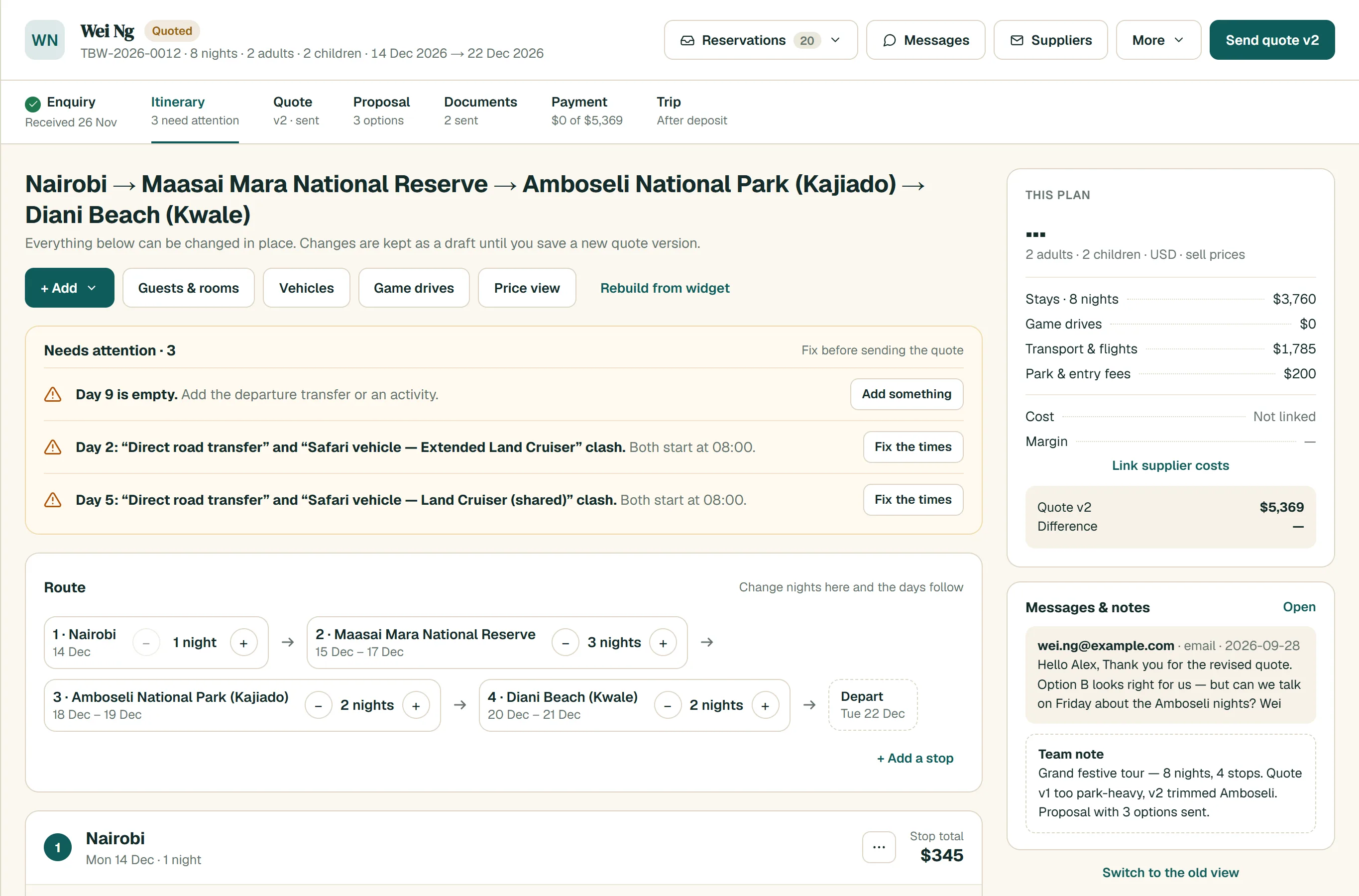
An activity moves from the library onto Day 2 — the plan, prices and documents update together.
Adjust the itinerary in your Workspace. Your guest’s proposal page reflects the change, at the same URL.
One quote also creates a PDF portfolio. Documents and payments stay with the booking.
M-Pesa or card.
Deposit matched to the booking.
Your itinerary, in one place.
Interaction study · shows an update, not a real booking or live sync
An enquiry carries its guest, itinerary, quote, documents and payments into the rest of your work. Your team can pick it up without starting again.
Work with enquiries in your inbox and keep guest relationships in CRM. Follow up with campaigns when your plan includes them.
Inbox · CRM · Campaigns · Notifications. Connected email starts on Operator; WhatsApp Business and campaigns are included on Growth and above.
Use Reservations, Quotes & docs and Calendar to follow the booking from the first enquiry through to the completed trip.
Reservations · Quotes & docs · Calendar · Payments. Keep itinerary details, guests, pricing, notes, documents and the booking stage together.
Keep your library, packages and document templates ready for the next quote. See your business in Reports.
Library · Packages · Documents & templates · Reports · Widget settings · Launchpad · Support. The full product has fifteen connected modules; access depends on your plan.
A familiar way for guests to pay
Guests pay their deposit on your website. The payment matches to their booking and the balance updates, so you can see what is paid and what is still due.
Payments, full documents and live proposals are included from Operator. Try them during your Growth trial.
KES 30,000
Payment stays with this booking.
Bring the properties and rates you already use. Choose from the shared library where it helps. You decide what your guests can see and quote.
Add your name, branding and currency. Connect the email and payment services you’ll use for bookings.
Add your rates, enable library items and prepare a package or a route. Review the pricing and availability conditions.
Use a script, an iframe or a hosted link. Test a guest enquiry before sharing it with customers.
Book a walkthrough of the catalog, widgets and booking workspace.
After 14 days of Growth, your workspace moves to Free unless you choose a paid plan. Free includes 10 enquiries a month and one seat. Features such as online payments and live proposals require Operator or above after the trial. No card is needed to start.
Yes. Use your own properties, activities, fleet and rates, enable items from our library, or use both. You can set your own selling prices for shared properties. You decide which items you offer to guests.
No. A priced property can be featured and quoted, but availability and the booking arrangements still need confirming with the property. The shared library gives you a starting point for a quote.
Our September 2026 library covers Kenya: 240 destinations with researched entry fees out of 376 destinations, with more African countries coming soon. Fee structures vary by operator and may depend on residency, age, season, duration or fee basis. Check the recorded source, date and conditions before confirming the quote.
No. Add a widget with a script or iframe, or use a hosted link. The widget uses your branding, rates and currency. Your guests can build a custom trip or choose a package you have prepared.
Yes. M-Pesa and card deposits are supported on your own site and matched to bookings. You need to connect the relevant payment service. Payments are available during the Growth trial and on Operator, Growth, Pro and Enterprise.
Yes. One quote produces a PDF portfolio and a live proposal link. The link reflects itinerary updates; an already-downloaded PDF remains a snapshot. Proforma, invoice and receipt documents follow the same booking.
Start with the workflow you need. Operator includes two seats and 50 enquiries a month; Growth includes six seats and 250 enquiries. You can use the trial to work through your own process before choosing.
Build your first trip with a researched library
and a workspace ready for the enquiry.
14 days of Growth · No card · Free afterwards
Walk through a guest enquiry, a quote and a proposal. See how the library fits the trips you sell.
Book a walkthrough ↗Already have a workspace? Log in